Working with AI agents
The to-do app for working with AI agents
When you work with AI agents, you copy instructions into a chat and dig through the history for results. In TandemLoop, you and your agent work in the same projects and tasks: you assign, your agent does the work and attaches the result to the task.
- Please process my inbox and create the open items from our session as tasks in the “Online course” project.
- Inbox processed – 5 items filed
- Confirm access to the course platform → Online course, due tomorrow
- Decide: price for the online course → Online course
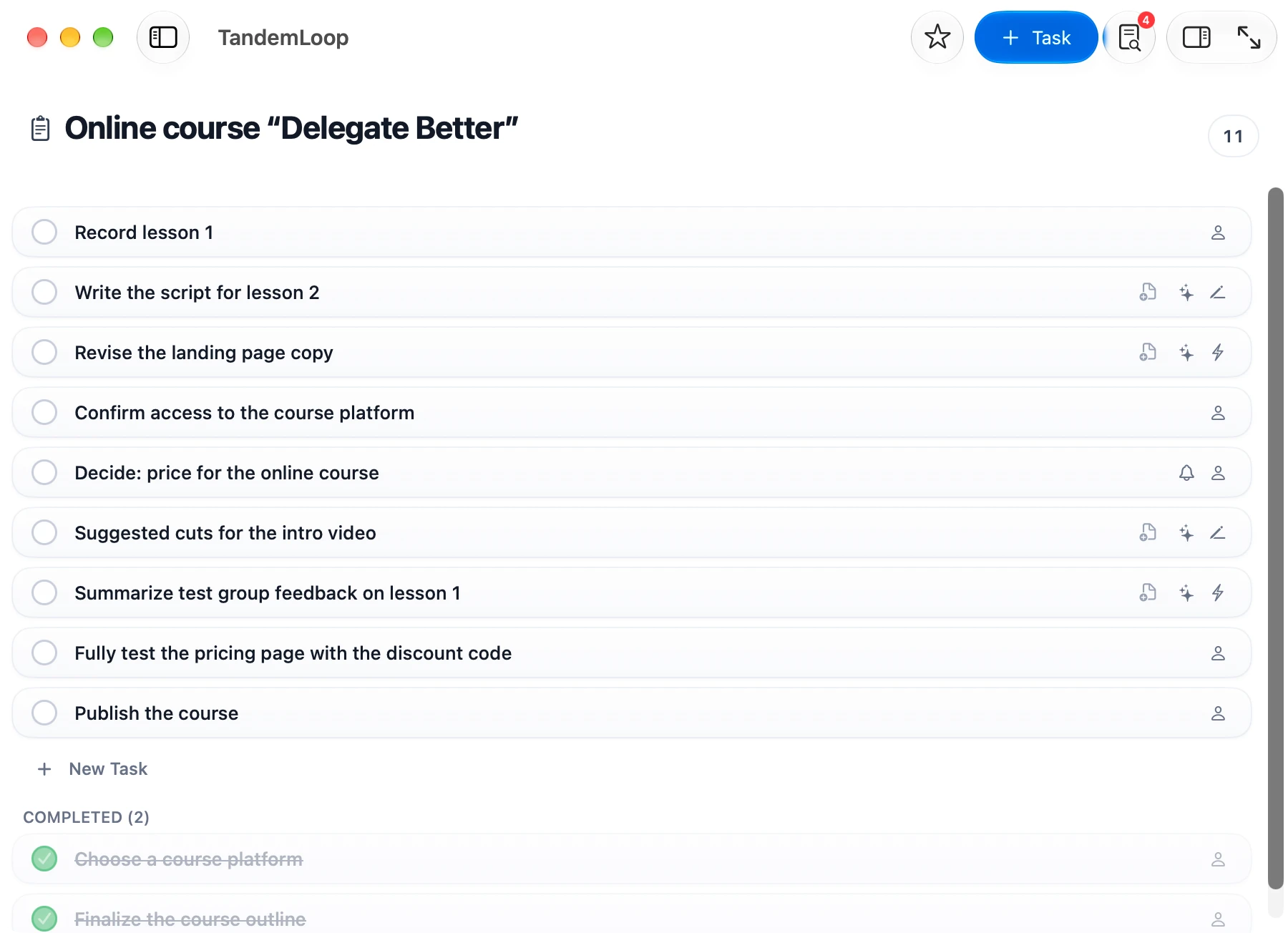
- 3 new tasks in “Online course”:
- Suggested cuts for the intro video (assigned to me, draft)
- Summarize test group feedback on lesson 1 (assigned to me)
- Fully test the pricing page with the discount code (assigned to you)
With agents that read and write files
- Claude CodeTerminal and editor
- Claude CoworkDesktop app
- CodexTerminal and app
- CursorEditor
- Gemini CLITerminal
- Google AntigravityDevelopment environment
All names and logos belong to their respective owners. TandemLoop is not affiliated with any of these providers.
You → agent
Delegate tasks to Claude Code, Codex, or Cursor
Assign a task to your agent—in a project, in the Inbox, or as you capture it with “For the AI agent.” Your agent finds the task where it is instead of having it explained in a chat.
For each task, you set how independently it works: Do, Draft, or Ask. Your agent does the task, prepares a draft first, or asks before it starts.
For bigger jobs, write a spec on the task: goal, requirements, acceptance criteria. Copy Prompt puts a short instruction that points to the task on your clipboard. Your agent reads the rest itself.
- Work through your tasks.
- Sources for chapter 3: handed back the list as a draft for review
---
title: Research sources for chapter 3
assigned_to: ai
delegation: draft
status: needs-review
---
Handing off a task, step by step
Assign
You assign the task to your agent and choose whether it does the task, prepares a draft, or asks first.
AIDraftAgent works
It picks up its tasks, requested changes and overdue ones first, and reads the spec and the project goal.
› Work through your tasks.Result on the task
The task’s history shows what it did, with a link to the result.
History · AI agent, Oct 20: Script attached, please check the opening.Back from Agent
Completed, for review, or with a question. It reads your response on its next run.
For Review
# 1 Assign
assigned_to: ai
delegation: draft

# 2 Agent works
status: active

# 3 Result on the task
## AI agent — 2026-10-20

# 4 Back from Agent
status: needs-review
Agent → you
Back from Agent
When your agent has prepared something, it hands the task back for review. If it needs a decision, information, or access, it asks a question. Every handback carries its note: what it did, where the result is, and what you need to do.
Handbacks collect in the sidebar under Back from Agent, on iPhone in the From Agent tab, and arrive with a notification. You can undo every response.
Whatever only you can do, your agent creates as a task for you. If it needs an API key for a coding project, “Register for API access” shows up in your project instead of in the fourth paragraph of its reply.
- Work through your tasks.
- Analyzed the survey and handed it back for review
For ReviewAnalyzed 28 responses; the three most common requests are at the top. Result: Survey-Analysis.md. Please check whether the weighting is right.
---
title: Analyze survey results
assigned_to: ai
status: needs-review
---

## AI agent — 2026-10-20
**For review:** Analyzed 28 responses; the three most common requests are at the top. Result: Survey-Analysis.md. Please check whether the weighting is right.
Inbox and weekly review
Let your agent bring order
- Process my Inbox.
- Filed 7 items into your projects and suggested priorities
- 2 items need your decision
- What matters this week?
- Reading active projects, due dates, and Waiting For items…
- Quote for Lindner Law—due Wednesday
- Decide the price of the online course—the landing page depends on it
- Follow up with Holzmann Woodworks—waiting for 9 days
- Prepare my weekly review.
- Reviewed 12 projects
- No next action: Move, Newsletter
- 4 tasks haven’t moved in over two weeks.
- Add the open items from our session as tasks in the project.
- Created 4 tasks in the App Launch project
- 2 of them are for you: create the API key, invite beta testers
On request
Have your agent build views, projects, and areas
Ask your agent for a view with everything due in the next two weeks, a project with milestones, or a board for the relaunch. The app shows the result right away.
It also creates custom fields such as “Client” or “Budget,” and themes.
- Set up a board where we work together: one column for me, one for you.
- Created view “Collaboration”: a board with your column and mine
Record lesson 1Online course · Fri
Send quote to Lindner LawClients
Write script for lesson 2Draft · Online course
Analyze competitor websitesDo · Sunfield Bakery
name: Collaboration
layout: board
layout_options:
  board_by: assigned_to
  column_order: [human, ai]
Proposals
Let it propose first, then approve
If you want more control, turn on proposals in Settings › AI Agents. Your agent then only adds new items to the Inbox directly and saves everything else as a proposal.
You approve all or part of it, reject it, or send it back with a comment to revise. Proposals are off by default.
- File my Inbox.
- Saved proposal “File Inbox items”; it’s waiting for your approval
File Inbox items
Three items in your Inbox belong to the newsletter you want to launch in November.
Setup
How your AI agent works with TandemLoop
- I work with TandemLoop, a to-do app. First, read the instructions in this folder…
- Reading the instructions…
- Added to your Inbox: Assign my agent its first real task
- Handed back the welcome task for review
- Should I remember this folder permanently, for example in your CLAUDE.md?
AGENTS.md  ← Instructions for your agent
_inbox/
  tsk_welcome.md
bereiche/
  work/
    _projects/
      online-course/
        prj_online-course.md
        _tasks/
          tsk_script-lesson-2.md
_views/
  vw_collaboration.yaml
Set up with the tutorial
The Mac app gives you a start prompt for your agent. Your agent reads the instructions that TandemLoop puts in the folder and keeps up to date, then reports back under Back from Agent.
Your agent works on the Mac
The app shows its changes right away. On iPhone, you capture tasks and answer questions, and iCloud keeps everything in sync.
On request or in a loop
The included worker skill describes one work cycle. In Claude Code, /loop 10m /tandem-worker runs it every ten minutes.
Use cases
For vibe coding, agentic engineering, and knowledge work
Vibe coding and agentic engineering
You build software with Claude Code, Codex, or Cursor. Link the data folder into your code project, and your agent knows your shared tasks alongside the code.
- Open items at the end of a coding session become tasks in the project.
- Add a DNS record, create an App Store account, activate a payment provider: what only you can do shows up there as your task.
- A release checklist as a project: your agent works through its items, you work through yours, and the board shows whose turn it is.
- Your agent works on code tasks in its own branch and hands them back for review. You decide on the merge.
Freelancers, consultants, and knowledge work
You work with Claude, ChatGPT, or Gemini every day on writing, research, and concepts. What can work with you is not the chat in your browser but the provider’s tool with folder access, such as Claude Cowork, Codex, or Gemini CLI.
- Assign research for a client project: the result is a file in the project folder, linked on the task.
- Have your agent draft quotes, course copy, or newsletters, and sign off on them with Accept.
- Have your agent create the follow-up tasks from workshop notes, for you and for itself.
Method
Agentic GTD
Getting Things Done as an agentic workflow, with an AI agent at your side: the five steps stay the same, and part of the work moves to your agent. You decide who does what. The guide to the GTD method covers the basics.
Capture
YouQuick Entry, the Share menu, Siri—or the agent creates the task right in the project.
Clarify
AgentIt turns vague entries into clear tasks and asks where something is unclear.
Organize
AgentIt assigns tasks to projects and sets dates.
Reflect
BothIt prepares the weekly review, and you decide on priorities.
Engage
BothYou do your tasks, it does its own—in the same to-do app.
FAQ
Frequently asked questions about TandemLoop and AI agents
Which AI agents work with TandemLoop?
Any AI agent that can access a folder on your Mac and read and write files there, for example Claude Code, Claude Cowork, Codex, Cursor, Gemini CLI, or Google Antigravity. TandemLoop doesn’t favor any tool. If you switch agents, the new one picks up the same tasks.
Does TandemLoop work with ChatGPT?
Not with ChatGPT in the browser: a chat without folder access can neither read nor create your tasks. The same goes for Claude and Gemini in the browser. From the same providers, Codex (OpenAI), Claude Code and Claude Cowork (Anthropic), and Gemini CLI and Antigravity (Google) work with TandemLoop because they edit files on your Mac.
Is TandemLoop itself an AI?
No. TandemLoop contains no AI and doesn’t call any AI services. You work with the agent you already use, on its own subscription. Without an agent, TandemLoop is a complete to-do app.
Do I need a plug-in, an API, or an MCP server?
No. Tasks, projects, and views are Markdown files. Your agent reads and writes them directly, following the AGENTS.md instructions in the same folder.
What is the agent allowed to do in TandemLoop?
It has access to everything in the data folder: it creates tasks, projects, areas, and views, changes and moves them, files Inbox items, and cleans up as the work requires. It learns how TandemLoop is structured from the AGENTS.md manual.
Is my data safe?
TandemLoop needs no account, has no server of its own, and collects no data. Your tasks are files in your iCloud Drive. Whatever your agent reads, it processes under its provider’s terms—you decide which tool gets access to the folder.
Can the agent work while I’m on the go?
Yes, if it runs in a loop on your Mac. On iPhone, you capture new tasks and answer questions in the From Agent tab, and iCloud carries the changes to your Mac and back. The agent’s changes don’t appear on iPhone in real time, but as soon as iCloud has synced them.
Can several agents work with TandemLoop?
You can connect several agents and switch between them; they all use the same data folder and the same rules. Only one should write at a time, though, or iCloud sync may create conflicted copies.